Modern workplaces rely on clear communication, whether employees are attending online meetings, helping customers, or collaborating with remote teams. A comfortable wireless headset can make everyday conversations more convenient by allowing users to move freely while staying connected. Choosing the right headset also helps businesses create a more organized and productive communication environment.
Reliable Audio for Everyday Business Calls
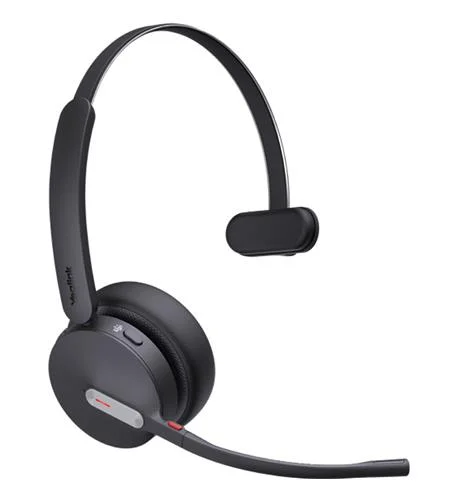
The Yealink BH70 Dual/Mono Bluetooth Wireless Headset is designed for professional communication in offices, home workspaces, and other business environments. It features three microphones with noise-cancellation technology to help reduce background noise during calls. Its 35 mm speakers deliver audio for conversations and music, making it suitable for employees who regularly switch between meetings and other work tasks.
Clear voice transmission can be especially valuable for customer service teams, sales professionals, and remote workers who depend on frequent calls.
Mono and Dual Wearing Options
Different working environments require different headset styles. The mono version uses a single earpiece, allowing users to remain more aware of surrounding conversations and workplace activity. The dual version covers both ears and provides stereo audio, which can help users focus during meetings and calls.
Businesses can choose the style that best matches employee responsibilities, office conditions, and personal comfort preferences.
Wireless Connectivity and Device Compatibility
Bluetooth connectivity gives employees greater freedom to move around without being restricted by a headset cable. The BH70 supports Bluetooth 5.3 and offers a wireless range of up to 50 meters under suitable conditions. Actual range may vary depending on walls, interference, and connected devices.
The headset can connect to two Bluetooth devices simultaneously and store pairings for up to eight devices. This can be convenient for employees who use both a computer and a smartphone throughout the workday. Available USB-A, USB-C, Teams, and UC configurations allow businesses to select an option that matches their equipment and communication platform.
Long Battery Life for Busy Workdays
Battery performance is an important consideration for professionals who spend several hours on calls. The BH70 offers up to 35 hours of talk time with the busy light switched off and up to 28 hours with it switched on. Music playback can reach up to 43 hours under specified conditions.
These figures depend on usage and settings, but the battery capacity can help reduce the need for frequent charging during a busy schedule.
Convenient Controls and Workplace Features
Practical controls make a headset easier to use throughout the day. The BH70 supports call answering, ending and rejecting, volume adjustment, and microphone muting. Its microphone boom can also be moved upward to mute and downward to unmute.
A built-in busy light helps signal when someone is on a call, which may reduce interruptions in shared office spaces. The lightweight design, weighing approximately 91 grams for mono and 147 grams for dual, also supports everyday workplace use.
Choosing the Right Headset for Your Team
Before purchasing a headset, businesses should review wearing style, device compatibility, connection options, battery requirements, and the communication applications employees use. It is also important to confirm whether the selected configuration includes a USB dongle or optional charging stand.
Companies seeking a professional wireless communication solution can explore the Yealink BH70 Dual/Mono Bluetooth Wireless Headset to compare available configurations and select an option suited to their workplace.
Conclusion
A reliable bluetooth wireless headset can support flexible working, convenient call management, and clear business communication. With three microphones, Bluetooth connectivity, long battery life, and mono or dual wearing options, the Yealink BH70 series offers practical features for offices, remote teams, and customer support environments. Choosing a suitable configuration helps businesses build a communication setup that meets their daily needs.